 Slowly
Data sources
External APIs as dynamic content, resolved on the server so keys never leave it.
Experimental. The engine behind data sources is verified at the server level, but the feature has not yet been exercised end to end on a production site. Expect rough edges, and treat it as a preview rather than a promise.
A data source connects Slowly to content that lives somewhere else, headless style: a Notion page, a Google Sheet, a headless CMS, any system that answers JSON over a URL. Register the endpoint once and its values become dynamic content everywhere, inserted like any post field.
Sources are fetched with GET plus your auth headers. That covers a Notion page's properties, the Google Sheets values API, and most headless CMS read APIs; endpoints that require POST (like Notion database queries) are not supported yet.
Registering a source
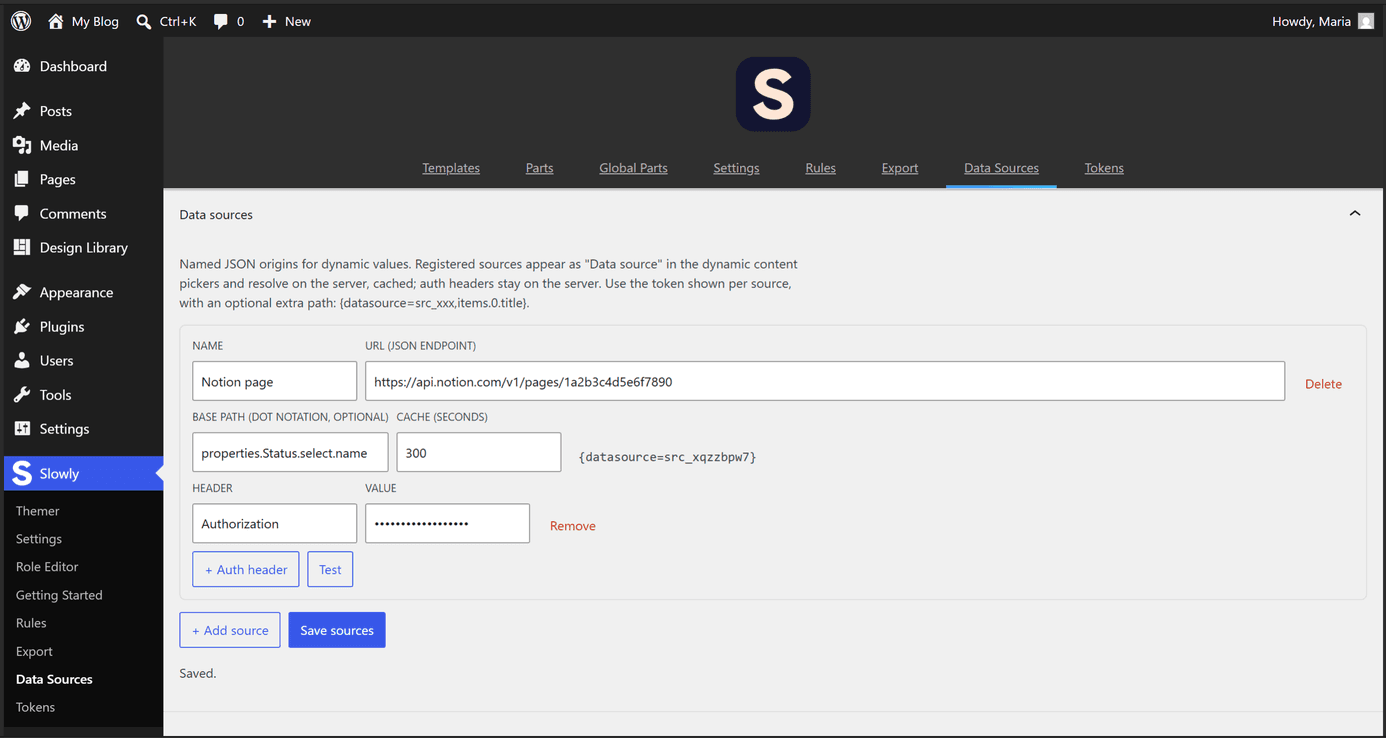
Sources are managed under Slowly → Data Sources. Each one carries:
- Name and URL, the JSON endpoint.
- Base path, optional, in dot notation (
data.items.0.name), pointing at the part of the response you care about. - Cache, how many seconds the fetched response is kept before the endpoint is asked again. The default is 300, the minimum 30.
- Auth headers, name and value pairs sent with the request, for endpoints that need an API key.
Every saved source gets an id like src_a1b2c3d4 and shows its ready-to-use token. The Test button saves, fetches through the real resolver, and shows what comes back. Saving also clears the caches, so edits take effect at once.
Using a source
In the dynamic values panel, pick Data Source in the Source dropdown, choose the source, and optionally add a path that extends the base path. Other dynamic pickers offer the same thing as a keyed entry, where the Key is src_a1b2c3d4,extra.path. The underlying token is {datasource=src_a1b2c3d4,items.0.title}.
The canvas previews the resolved value while you build.
Security
Resolution happens entirely on the server. The editor receives the source names and ids only, never the header values, so API keys do not reach the browser, and the canvas preview asks the server for the finished value. Requests go through WordPress's SSRF-guarded HTTP layer. When a fetch fails, the value renders empty (or your fallback) and the endpoint is retried after a minute.