 Slowly
Design tokens
Import tokens from Penpot or Figma and keep editing them as globals, not code.
Design tokens exported from a design tool can be imported straight into the design system. The import creates real global objects, edited afterwards in the normal panels. The JSON is the seed, not the product.
Importing
The import lives under Slowly → Tokens. Paste or upload the exported file. Two formats are read by the same importer:
- W3C tokens JSON, which Penpot exports natively.
- Tokens Studio JSON, the usual Figma path via the free Tokens Studio plugin.
Alias references between tokens resolve during import; anything unresolvable is reported rather than guessed. Dry run shows exactly what would be created, updated, left unchanged, or detached, without touching anything. Import applies it and shows the same report.
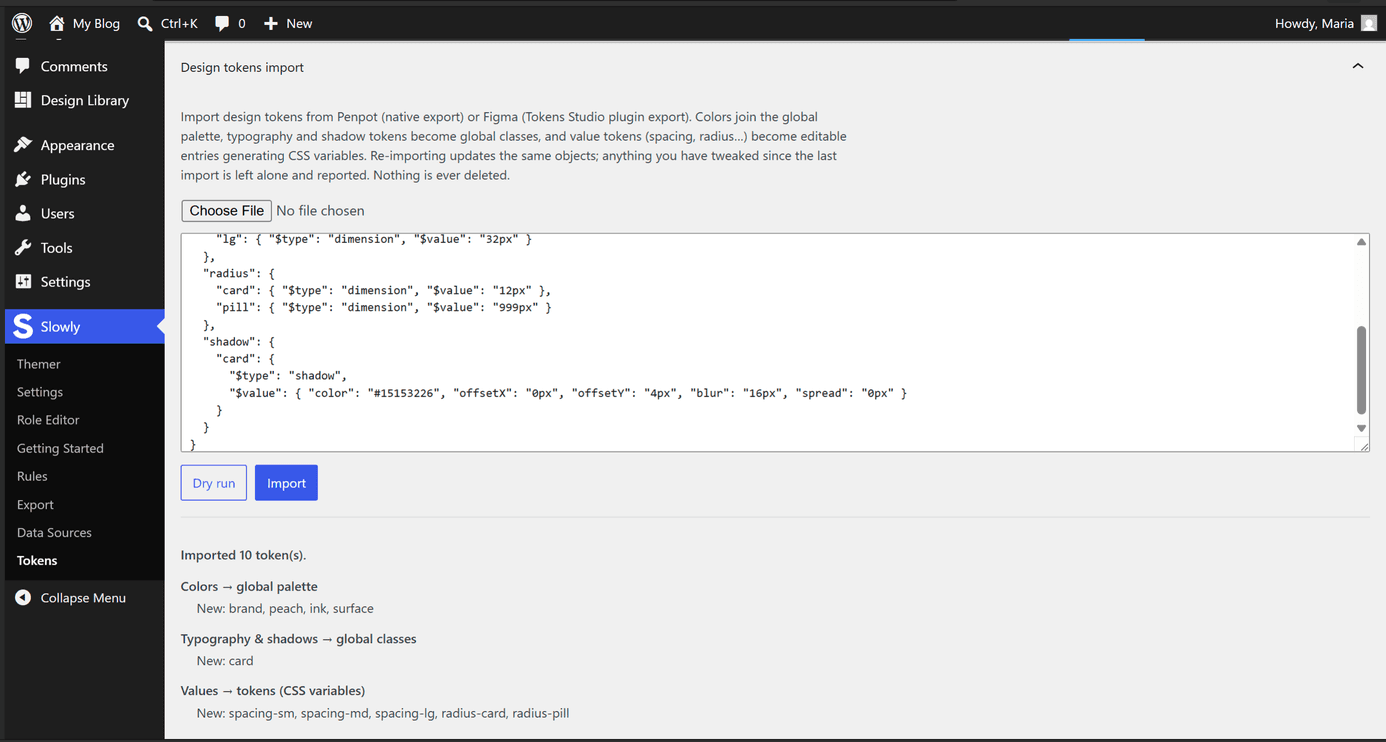
Where tokens land
| Token type | Becomes | Edited in |
|---|---|---|
| Colour | A global palette entry | Global colours |
| Typography | A global class carrying the font attributes | Global classes, the design panel |
| Shadow | A global class with the shadow | Global classes, the design panel |
| Values (spacing, sizing, radius, opacity) | Token entries generating CSS variables | The Tokens tab in the Globals area |
Value tokens are written into a Design Tokens stylesheet as custom properties, so var(--space-md) works anywhere CSS reaches.
Re-importing
Re-import updates the same objects in place and adds new ones. Nothing is ever deleted: tokens gone from the source are listed in the report and kept on the site. Objects you edited since the last import are detached, skipped, and reported, so your changes win over the file.
The Tokens tab
The Globals area carries a Tokens tab beside Colors and Elements. It lists the value tokens, imported or added by hand: edit a value or its type, click a name to copy its var(), add or remove entries. Saving regenerates the variables so every use follows.