 Slowly
Rules
Site-wide rules that set block attributes at render time, with optional conditions.
A rule changes a block attribute across the whole site without touching the pages the block sits on. Point every menu block at a different menu for another language, force a tag on every container carrying a class, switch a toggle for a whole block type: one rule, applied wherever its target matches.
Rules are managed under Slowly → Rules.
What a rule is
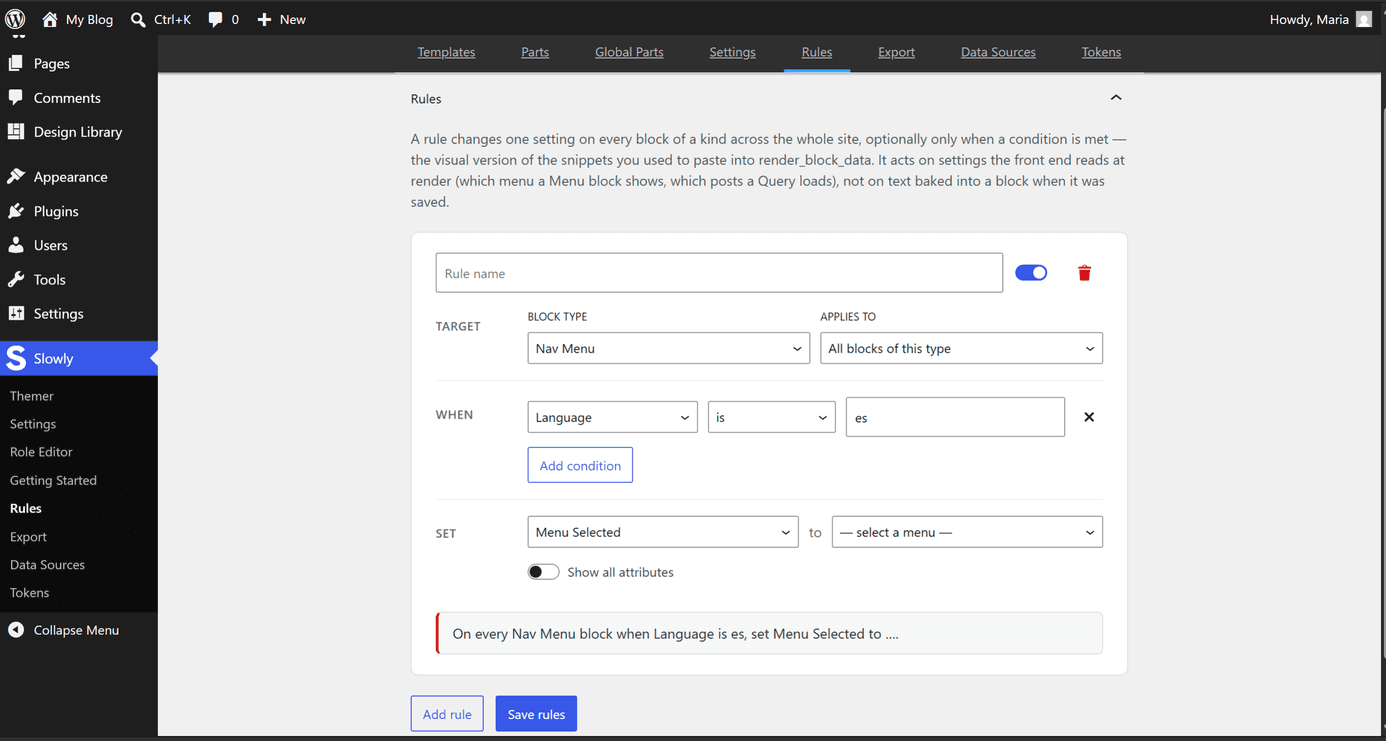
Each rule carries three things.
- A target. A block type, plus a scope: every block of that type, or only those with a given HTML id or additional class.
- An attribute and its value. The attribute list is derived from the block's own schema, so it always matches what the block supports, and the value control is typed to the attribute, a toggle for booleans, a menu picker for menu selection, and so on. Attributes baked into saved markup, such as rich text content, are deliberately not offered, since a rule cannot rewrite stored HTML.
- Conditions, optional. The same catalogue as block visibility conditions (language, user capability, and the rest), combined as all-of or any-of. A rule without conditions always applies.
Every rule in the list reads back as a plain sentence, and can be disabled without being deleted.
When rules apply
Rules run on the server, at render time, for every block on the front end. The editor canvas shows blocks as they were saved; the rendered page shows them with rules applied. Loading happens once per request and costs nothing when no rules exist.